12 Heatmap to visualise Multivariate Data
Hands-On Exercise for Week 6
(First Published: May 18, 2023)
12.1 Learning Outcome
We will learn to plot static and interactive heatmap for visualising and analysing multivariate data.
Heatmaps are good for showing variance across multiple variables, revealing any patterns, displaying whether any variables are similar to each other, and for detecting if any correlations exist in-between them.
12.2 Getting Started
12.2.1 Install and load the required r libraries
Install and load the the required R packages. The name and function of the new packages that will be used for this exercise are as follow:
seriation : includes various algorithms and methods for ordering objects and variables, such as hierarchical clustering-based seriation, matrix reordering, and optimal leaf ordering
heatmaply : used for creating interactive and customizable heatmaps
dendextend : for manipulating and enhancing dendrograms
12.2.2 Import the data
We import the data set for World Happines 2018 report and assign it to wh.
Transform the data frame into a matrix
We need to transform the data frame to a data matrix to generate the heatmap. Before generating the data matrix, we will need to:
- Select country and the relevant attributes which we are keen to visualise.
- Change the default row name (which is in a numeric series) to the country name.
We will exclude the country column from the data matrix since the information is now captured as row names.
12.3 Plot static Heatmap
The R packages and functions for drawing static heatmaps are:
heatmap()of R stats package. It draws a simple heatmap.heatmap.2()of gplots R package. It draws an enhanced heatmap compared to the R base function.pheatmap()of pheatmap R package. pheatmap package also known as Pretty Heatmap. The package provides functions to draws pretty heatmaps and provides more control to change the appearance of heatmaps.ComplexHeatmap package of R/Bioconductor package. The package draws, annotates and arranges complex heatmaps (very useful for genomic data analysis). The full reference guide of the package is available here.
superheat package: A Graphical Tool for Exploring Complex Datasets Using Heatmaps. A system for generating extendable and customizable heatmaps for exploring complex datasets, including big data and data with multiple data types. The full reference guide of the package is available here.
Next, we will learn how to plot static heatmaps by using heatmap() of R Stats package.
By default, heatmap() plots a cluster dendrogram heatmap. The arguments Rowv=NA and Colv=NA are used to switch off the option of plotting the row and column dendrograms.
If we were to generate the default dendrogram heatmap (without specifying the Rowv and Colv arguments), the order of both rows and columns maybe be different from the plot below. This is because the dendrogram feature will do a reordering using clustering: it calculates the distance between each pair of rows and columns, and try to group and order them by similarity.
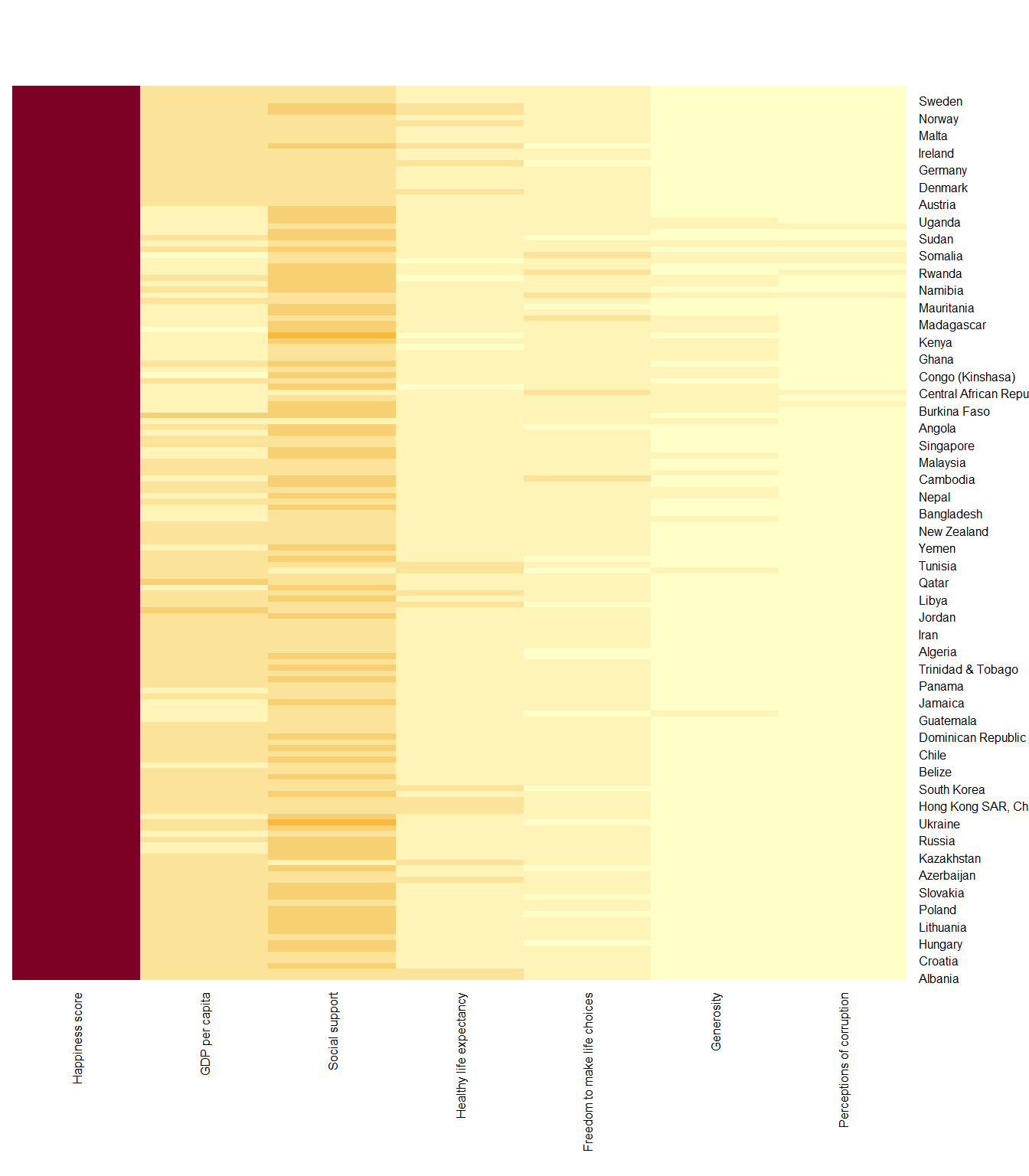
This heatmap is not really informative. Indeed, the Happiness Score variable have relatively higher values, what makes that the other variables with small values all look the same. Thus, we need to normalize this matrix. This is done using the scale argument. It can be applied to rows or to columns.
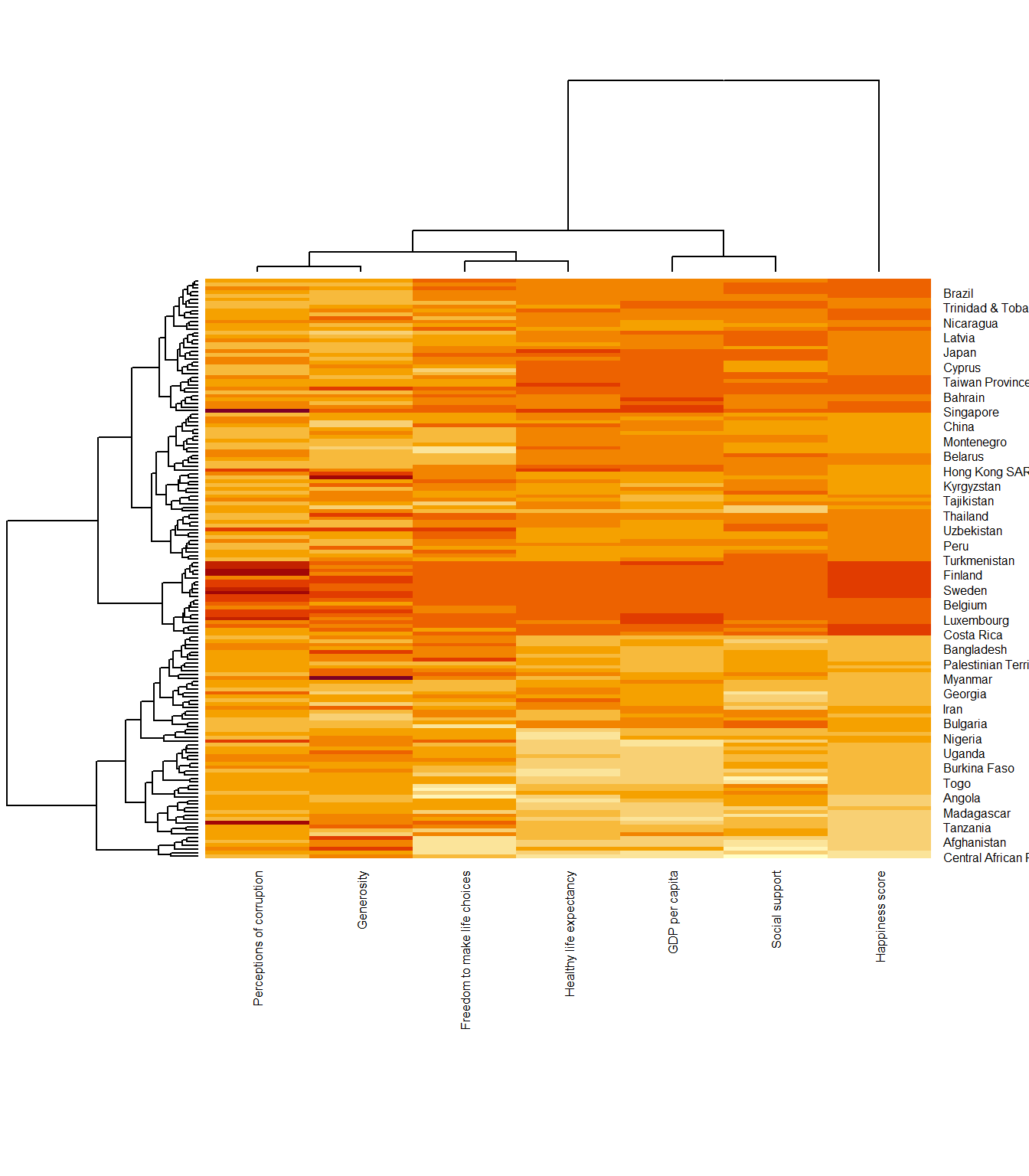
The plot below has its column-wise values normalised.
Notice that the values are scaled now. Also note that margins argument is used to ensure that the entire x-axis labels are displayed completely and, cexRow and cexCol arguments are used to define the font size used for y-axis and x-axis labels respectively.
12.4 Create Interactive Heatmap
heatmaply is an R package for building interactive cluster heatmap that can be shared online as a stand-alone HTML file. It is designed and maintained by Tal Galili.
12.4.1 The basic plot with heatmaply
We will use heatmaply to design an interactive cluster heatmap. We will still use the wh_matrix as the input data.
We will extract a subset of 30 records from the wh_matrix to make it easier for us to see the effects of each tweak we are making to the plot.
Different from heatmap(), for heatmaply() the default horizontal dendrogram is placed on the right hand side of the heatmap.
The text label of each raw, on the other hand, is placed on the left hand side of the heat map.
When the x-axis marker labels are too long, they will be rotated by 135 degree from the north.
12.4.2 Data Transformation
When analysing multivariate data set, it is very common that the variables in the data sets includes values that reflect different types of measurement. In general, these variables’ values have their own range. In order to ensure that all the variables have comparable values, data transformation are commonly used before clustering.
Three main data transformation methods are supported by heatmaply(), namely: scale, normalise and percentilse.
12.4.2.1 Scaling
When all variables are came from or assumed to come from some normal distribution, then scaling (i.e.: subtract the mean and divide by the standard deviation) would bring them all close to the standard normal distribution. In such a case, each value would reflect the distance from the mean in units of standard deviation.
The scale argument in heatmaply() supports column and row scaling. In the plot behind, we scale variable values columewise.
12.4.2.2 Normalising
When variables in the data comes from possibly different (and non-normal) distributions, the normalize function can be used to bring data to the 0 to 1 scale by subtracting the minimum and dividing by the maximum of all observations.
This preserves the shape of each variable’s distribution while making them easily comparable on the same “scale”.
Different from Scaling, the normalise method is performed on the input data set i.e. wh_matrix as shown in the code chunk below.
12.4.2.3 Percentising
This is similar to ranking the variables, but instead of keeping the rank values, divide them by the maximal rank.
This is done by using the ecdf of the variables on their own values, bringing each value to its empirical percentile.
The benefit of the percentize function is that each value has a relatively clear interpretation, it is the percent of observations that got that value or below it.
Similar to Normalize method, the Percentize method is also performed on the input data set instead of using an argument.
12.4.3 Clustering algorithm
heatmaply supports a variety of hierarchical clustering algorithms. The main arguments to provide are:
distfun: function used to compute the distance (dissimilarity) between both rows and columns. Defaults to dist. To use correlation-based clustering, we can use options “pearson”, “spearman” or “kendall”, which use as.dist(1 - cor(t(x))) as the distance metric (using the specified correlation method).
hclustfun: function used to compute the hierarchical clustering when Rowv or Colv are not dendrograms. Defaults to hclust.
dist_method: default is NULL, which results in “euclidean” to be used. It can accept alternative character strings indicating the method to be passed to distfun. By default distfun is “dist”” hence this can be one of “euclidean”, “maximum”, “manhattan”, “canberra”, “binary” or “minkowski”.
hclust_method default is NULL, which results in “complete” method to be used. It can accept alternative character strings indicating the method to be passed to hclustfun. By default hclustfun is hclust hence this can be one of “ward.D”, “ward.D2”, “single”, “complete”, “average” (= UPGMA), “mcquitty” (= WPGMA), “median” (= WPGMC) or “centroid” (= UPGMC).
In general, a clustering model can be calibrated either manually or statistically.
12.4.3.1 Manual approach
The following heatmap is plotted by using hierachical clustering algorithm with “Euclidean distance” and “ward.D” method.
12.4.3.2 Statistical approach
In order to determine the best clustering method and number of cluster the dend_expend() and find_k() functions of dendextend package will be used.
First, the dend_expend() will be used to determine the recommended clustering method to be used.
Show the code
  dist_methods hclust_methods     optim
5      unknown        average 0.7814164
6      unknown       mcquitty 0.7793163
8      unknown       centroid 0.7680779
3      unknown         single 0.7432104
7      unknown         median 0.6990172
4      unknown       complete 0.6959322
2      unknown        ward.D2 0.5690666
1      unknown         ward.D 0.4642559
The output table shows that “average” method should be used because it gives the highest optimum value. Next, find_k() is used to determine the optimal number of cluster.
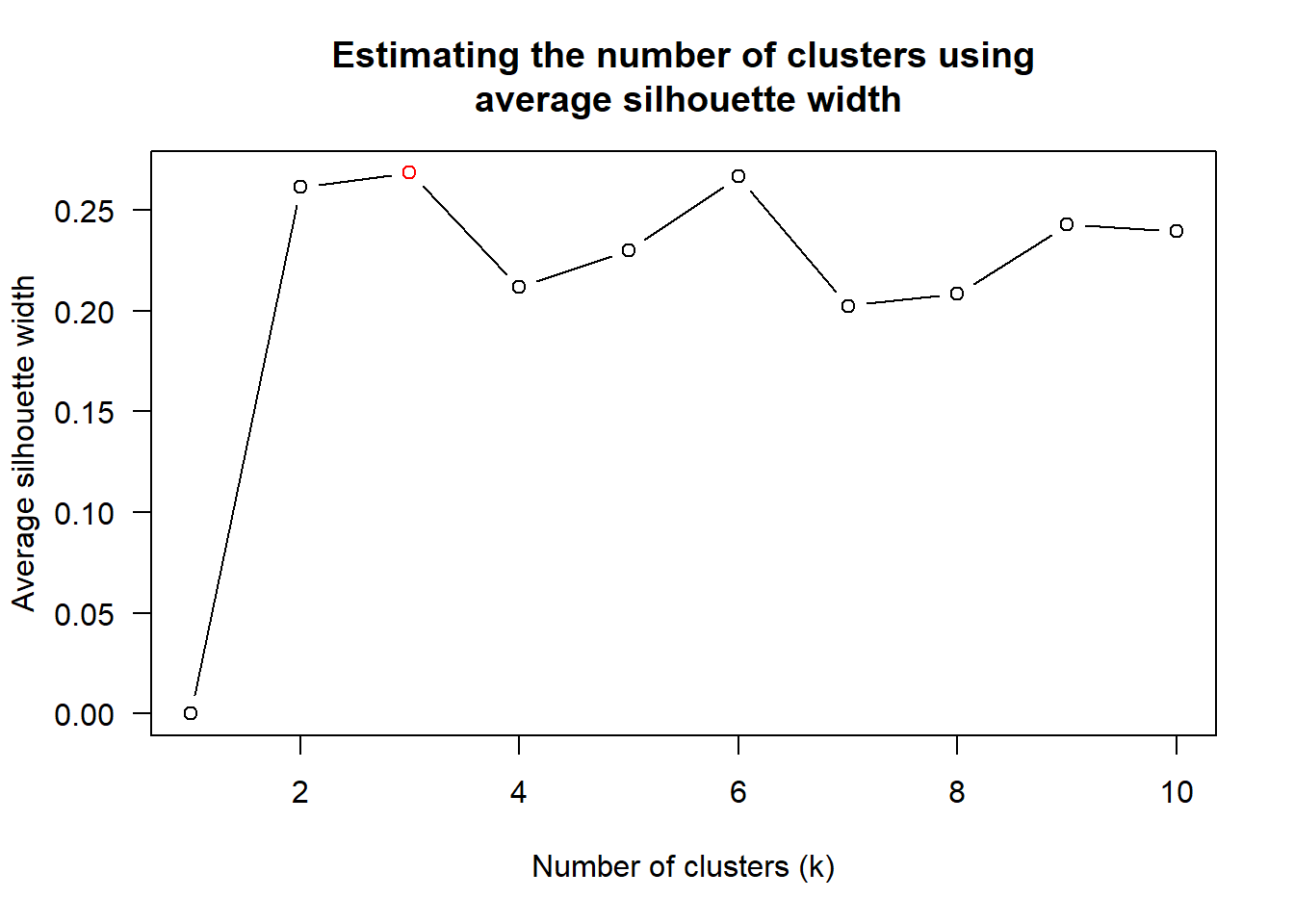
The figure above shows that k=3 would be good.
Check out my Geospatial Analytics page here where I shared 2 other methods - Elbow and Gap Statistic - to find the best k.
Using the statistical analysis results, we can prepare the hierarchical plot.
12.4.4 Seriation
One problem with hierarchical clustering is that it doesn’t actually place the rows in a definite order, it merely constrains the space of possible orderings. Take three items A, B and C. If you ignore reflections, there are three possible orderings: ABC, ACB, BAC. If clustering them gives you ((A+B)+C) as a tree, you know that C can’t end up between A and B, but it doesn’t tell you which way to flip the A+B cluster. It doesn’t tell you if the ABC ordering will lead to a clearer-looking heatmap than the BAC ordering.
heatmaply uses the seriation package to find an optimal ordering of rows and columns. Optimal means to optimize the Hamiltonian path length that is restricted by the dendrogram structure. This, in other words, means to rotate the branches so that the sum of distances between each adjacent leaf (label) will be minimized. This is related to a restricted version of the travelling salesman problem.
Here we meet our first seriation algorithm: Optimal Leaf Ordering (OLO). This algorithm starts with the output of an agglomerative clustering algorithm and produces a unique ordering, one that flips the various branches of the dendrogram around so as to minimize the sum of dissimilarities between adjacent leaves. Here is the result of applying OLO to the same clustering result as the heatmap above.
The default options is “OLO” (Optimal leaf ordering) which optimizes the above criterion (in O(n^4)). Another option is “GW” (Gruvaeus and Wainer) which aims for the same goal but uses a potentially faster heuristic.
The option “mean” gives the output we would get by default from heatmap functions in other packages such as gplots::heatmap.2.
The option “none” gives us a dendrogram without any rotation that is based on the data matrix.
12.4.5 Working with color palettes
The default colour palette uses by heatmaply is viridis. We can use other colour palettes in order to improve the aestheticness and visual friendliness of the heatmap.
We use the Blues colour palette of rColorBrewer for the following plot.
12.4.6 The finishing touch
Beside providing a wide collection of arguments for meeting the statistical analysis needs, heatmaply also provides many plotting features to ensure cartographic quality heatmap can be produced.
In the code chunk below the following arguments are used:
k_row is used to produce 5 groups.
margins is used to change the top margin to 60 and row margin to 200.
fontsizw_row and fontsize_col are used to change the font size for row and column labels to 5.
main is used to write the main title of the plot.
xlab and ylab are used to write the x-axis and y-axis labels respectively.
Which countries are clustered together with 🇸🇬?
Show the code
heatmaply(normalize(wh_matrix),
          Colv=NA,
          seriate = "none",
          colors = Blues,
          k_row = 5,
          margins = c(NA,200,60,NA),
          fontsize_row = 5,
          fontsize_col = 5,
          main="World Happiness Score and Variables by Country, 2018 \nDataTransformation using Normalise Method",
          xlab = "World Happiness Indicators",
          ylab = "World Countries"
          )
\(**That's\) \(all\) \(folks!**\)